
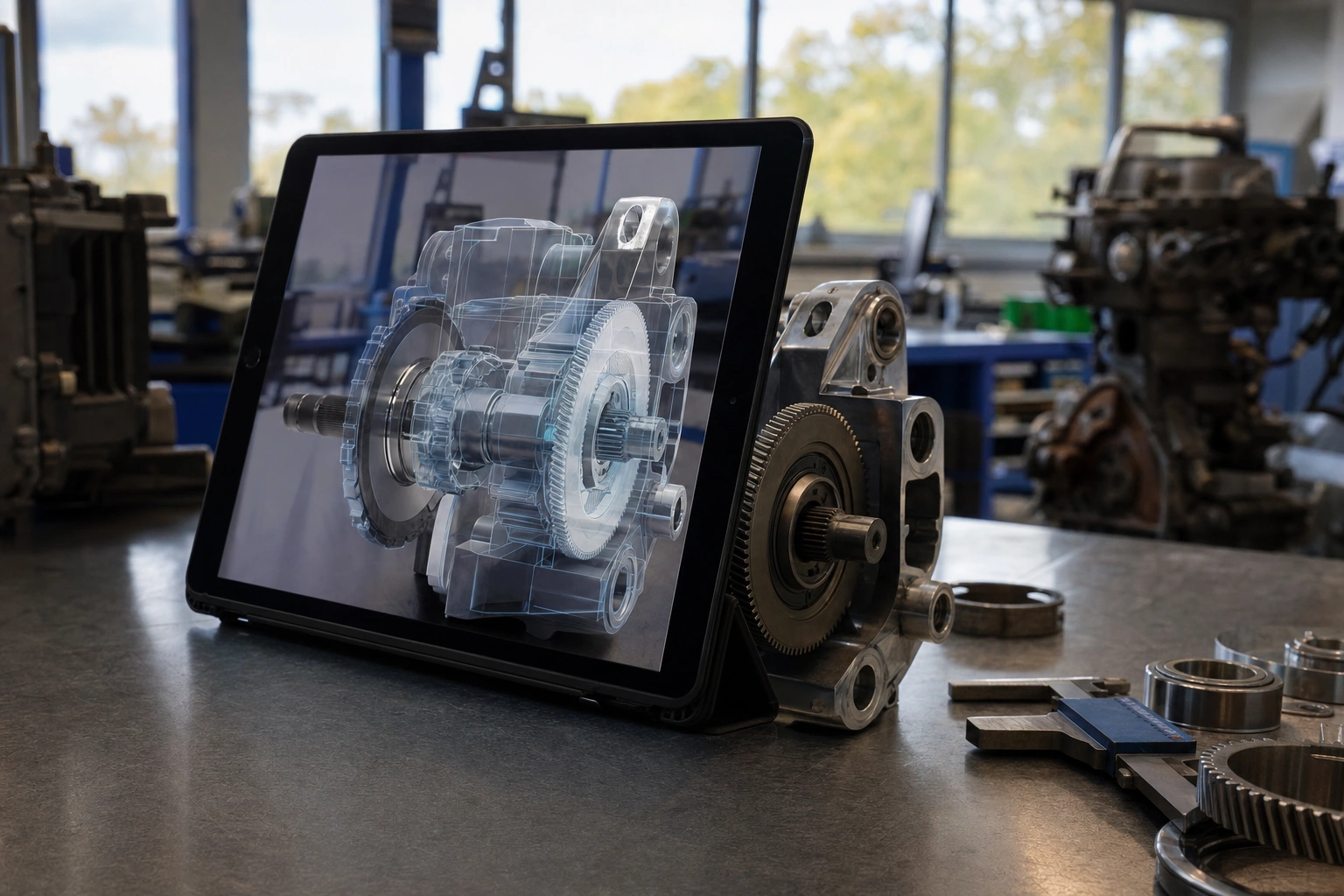
Augmented reality, commonly called AR, is a technology that adds computer-generated content to a person’s view of the real world. Unlike virtual reality, which replaces the physical environment with a simulated one, AR keeps the real environment visible and supplements it with digital information, images, sounds or interactive features.
Many people encounter AR through mobile phone filters, navigation tools, games and shopping applications. However, the technology has wider uses in education, healthcare, manufacturing, agriculture, construction, tourism and customer service. Understanding AR requires more than knowing that it places images on a screen. It involves examining how devices understand their surroundings, how digital content is designed, and how organisations can use the technology to solve practical problems.
What Is Augmented Reality?
Augmented reality is a system that combines the physical world with digital content in a way that appears connected to the user’s surroundings. The digital layer may be visible through a smartphone, tablet, smart glasses, a vehicle display or another compatible device.
For example, an AR application might use a phone’s camera to recognise a floor and show how a virtual sofa would look in a room. A maintenance worker might look at a machine through smart glasses and see labels indicating where specific components are located. A learner studying human anatomy might point a tablet at a model and view a three-dimensional representation of the heart.
The digital content does not necessarily have to look realistic. It could be an arrow showing which way to walk, a warning symbol, a measurement, a translated label or an animated diagram. The key idea is that the information is presented in relation to the user’s real environment.
How Augmented Reality Works
An AR experience usually depends on several technologies working together. The exact combination varies according to the device and application, but the main elements are as follows.
Camera and visual input
A camera captures images of the user’s surroundings. The AR system analyses this visual information to identify surfaces, objects, patterns or locations. A smartphone application may recognise a flat table, while an industrial system may identify a particular machine component.
Sensors and motion tracking
Devices contain sensors such as accelerometers and gyroscopes. These help determine movement, orientation and changes in position. If a user moves a phone around a room, the application uses sensor information to keep digital objects in an apparently stable position.
Computer vision and environmental understanding
Computer vision enables software to interpret visual information. The system may detect edges, surfaces, depth or distinctive features. It then creates an understanding of the surrounding space, often called a map or spatial model. This allows virtual content to be placed more convincingly.
Processing and software
Software decides what digital content to display and how it should respond. A training application may show instructions when a particular component is recognised. A navigation application may calculate a route and place directional arrows in the user’s view.
Display and audio
The result is delivered through a screen, headset, smart glasses, projection system or another interface. Some AR experiences also use spatial audio, allowing a sound to appear as though it comes from a particular direction. Good AR design makes the digital layer understandable without overwhelming the user or hiding important real-world details.
Augmented Reality, Virtual Reality and Mixed Reality
These terms are related, but they describe different experiences.
- Augmented reality: digital information is placed over or alongside the real world, which remains visible.
- Virtual reality: the user is immersed in a fully digital environment and usually cannot see the physical world directly.
- Mixed reality: digital objects are integrated more deeply with the physical environment and may interact with real surfaces, objects or spatial boundaries.
The boundaries are not always used consistently by technology companies, so it is sensible to examine what a product actually does rather than rely only on its label. A phone-based filter is an AR experience, while a headset that transports a user into a simulated factory is generally a VR experience. A system that allows a digital model to sit behind a real table and remain hidden when the table moves in front of it may be described as mixed reality.
Types of Augmented Reality
AR can be classified in several ways, depending on how it recognises the environment and how much interaction it provides.
Marker-based AR
Marker-based systems respond to a recognised image, symbol or physical marker. When a camera detects the marker, the application displays related content. A textbook could include a printed image that triggers a three-dimensional animation when scanned.
This approach is relatively easy to control because the experience begins at a known visual point. Its limitation is that users need access to the correct marker and suitable lighting for reliable recognition.
Markerless AR
Markerless systems do not require a special printed image. They use features such as surfaces, movement, location or surrounding geometry to position digital content. A furniture application that places a virtual product on a user’s floor is an example.
Markerless AR is convenient and flexible, but its accuracy may vary depending on lighting, device capability, surface texture and the complexity of the environment.
Location-based AR
Location-based AR uses information from technologies such as GPS, digital maps, compass sensors and mobile networks. It can provide directions, information about nearby landmarks or guidance connected to a particular place.
For instance, a tourism application could display historical information when a visitor approaches a heritage site. In Kenya, a location-based application could help visitors explore a national park, museum or coastal heritage area, provided the information is accurate and the system works reliably in the relevant environment.
Projection-based AR
Projection-based AR casts digital images onto physical surfaces. It can be used for demonstrations, interactive displays, product presentations or industrial guidance. Unlike screen-based AR, the projected content may be visible to several people at once.
Superimposition-based AR
Superimposition systems replace or modify part of a real-world view with digital content. A medical training application might show a virtual layer over a physical model, while a visualisation tool could display an alternative colour, finish or component on a real object.
Where Augmented Reality Is Used
Education and training
AR can make difficult or invisible concepts easier to explore. Learners can examine a rotating three-dimensional model of a machine, view layers of the Earth or observe how a chemical structure is arranged. It can also support practical training by presenting instructions beside the equipment being used.
Its value is greatest when the digital layer supports a clear learning objective. Simply adding animation does not guarantee better learning. An AR lesson should help learners observe, practise, compare, measure or make decisions in a way that ordinary materials cannot provide as effectively.
Healthcare
Healthcare professionals may use AR for training, visualisation, surgical planning, rehabilitation and patient education. A digital model can help explain anatomy or show how a treatment might affect a particular area. Such applications require careful validation, strong privacy controls and appropriate professional oversight, particularly when the technology influences clinical decisions.
Manufacturing and maintenance
AR can place assembly instructions, safety warnings and equipment information in the worker’s field of view. Instead of repeatedly consulting a manual, a technician may see the next step aligned with the relevant part of a machine. This can reduce unnecessary movement and help standardise complex procedures, although organisations must test whether the display improves rather than distracts from the work.
Retail and customer experience
Retailers use AR to help customers visualise products before buying. Customers may preview furniture in a room, test different colours or see how an item might fit a particular space. The experience can reduce uncertainty, but it should present product dimensions and appearance honestly. A virtual preview is not a substitute for accurate specifications.
Construction and architecture
Architects, engineers and site teams can compare digital building plans with physical spaces. AR may help identify where pipes, electrical systems or structural elements should be located. It can also assist clients in understanding a proposed design before construction is complete.
Agriculture
AR can support field training, equipment maintenance and the interpretation of farm information. A technician might view guidance while repairing irrigation equipment, while a learner could use AR to identify plant structures. These applications must account for outdoor conditions such as bright sunlight, dust, limited connectivity and the need for hands-free operation.
Tourism and cultural heritage
AR can add historical reconstructions, translated descriptions or interactive maps to physical locations. A visitor standing near an old building might see how it looked at an earlier period. The digital interpretation should be clearly distinguished from verified historical evidence so that an engaging experience does not create confusion between fact and speculation.
Benefits of Augmented Reality
AR offers several potential benefits when it is designed around a real need.
- Contextual information: users receive guidance near the object, location or task to which it relates.
- Visual understanding: three-dimensional models and overlays can make spatial relationships easier to grasp.
- Interactive practice: learners and workers can rehearse procedures without immediately relying on costly or dangerous real-world situations.
- Remote support: an expert may guide someone in another location by referring to the same physical equipment or environment.
- Customer confidence: product visualisation can help customers assess options before making a purchase.
- Accessibility: visual prompts, translations or audio cues may support people with different learning and communication needs, if the design is inclusive.
These benefits are not automatic. An AR system can also introduce distraction, inaccurate positioning or unnecessary complexity. The technology should be judged by whether it improves a task, not by how impressive it appears in a demonstration.
Limitations and Risks
Hardware and access
High-quality AR may require a recent smartphone, specialist glasses, reliable connectivity or sufficient battery power. This creates access challenges for schools, small businesses and users with older devices. Organisations should consider whether the intended audience can realistically use the system.
Accuracy and reliability
AR tracking can be affected by poor lighting, reflective surfaces, crowded spaces, weak positioning signals and changes in the environment. A misplaced arrow or incorrect equipment label could create confusion or safety risks. Important instructions should have a dependable alternative, such as a manual or direct supervision.
Privacy
Because AR devices use cameras, microphones, location data and sometimes facial or spatial information, they can collect sensitive details about people and places. Developers should collect only what is necessary, explain how data is used, secure it appropriately and provide meaningful choices where possible. Businesses should also consider whether recording bystanders is appropriate.
Safety and distraction
Users may focus on an overlay and fail to notice vehicles, machinery, uneven ground or other hazards. AR should not encourage people to look at screens while driving or walking through dangerous environments. Workplaces need clear rules about where and when AR devices may be used.
Design and inclusion
Text that is too small, bright or crowded can make an experience difficult to use. Designers should consider colour contrast, language, hearing and vision differences, physical movement, cognitive load and the availability of non-AR alternatives. A technology intended to improve access should not exclude people who cannot use the chosen device.
How to Plan an AR Project
Entrepreneurs and professionals should begin with the problem rather than the technology. A practical planning process can follow these steps.
- Define the user problem: identify the task that is slow, confusing, expensive, risky or difficult to visualise.
- Choose the AR interaction: decide whether users need a scan, overlay, navigation aid, three-dimensional model, remote instruction or another feature.
- Assess the environment: examine lighting, connectivity, noise, movement, available surfaces and safety conditions.
- Select the device: compare phones, tablets, headsets and other hardware according to cost, comfort, processing power and maintenance needs.
- Create a small prototype: test one important workflow before building a large application.
- Measure practical results: evaluate task accuracy, completion time, user understanding, error rates, satisfaction and accessibility.
- Plan governance: document data collection, permissions, security, training, support and procedures for situations where the AR system fails.
For example, a Kenyan vocational training centre might test an AR lesson for identifying engine components. It could begin with one engine model and a small learner group, compare the AR lesson with existing instruction, gather feedback from trainers, and revise the experience before investing in additional equipment.
Applying This in Practice
When evaluating an AR idea, ask the following questions:
- What will users understand or do better with AR than with a photograph, video, manual or instructor?
- Will the experience work in the real conditions where it will be used?
- What happens if the device loses power, connectivity or tracking accuracy?
- Does the design protect the privacy of users and bystanders?
- Can people with different abilities, languages and levels of digital confidence use it?
- What evidence will show that the project has delivered value?
A useful AR product is usually focused rather than overloaded. A maintenance application that clearly identifies one component may be more valuable than an elaborate system filled with animations. Start with a narrow use case, test it with real users and improve it based on observed behaviour.
Key Takeaways
- Augmented reality adds digital information to a view of the real world rather than replacing the physical environment.
- AR depends on cameras, sensors, computer vision, software and a display or audio interface.
- Marker-based, markerless, location-based, projection-based and superimposition-based systems support different situations.
- AR can assist education, healthcare, retail, manufacturing, construction, agriculture and tourism when it addresses a specific need.
- Accuracy, privacy, safety, device access and inclusive design must be considered before deployment.
- The strongest AR projects begin with a real user problem, use a small prototype and measure practical results.
No comments yet.