Lesson Video
Understanding the Internet
Introduction
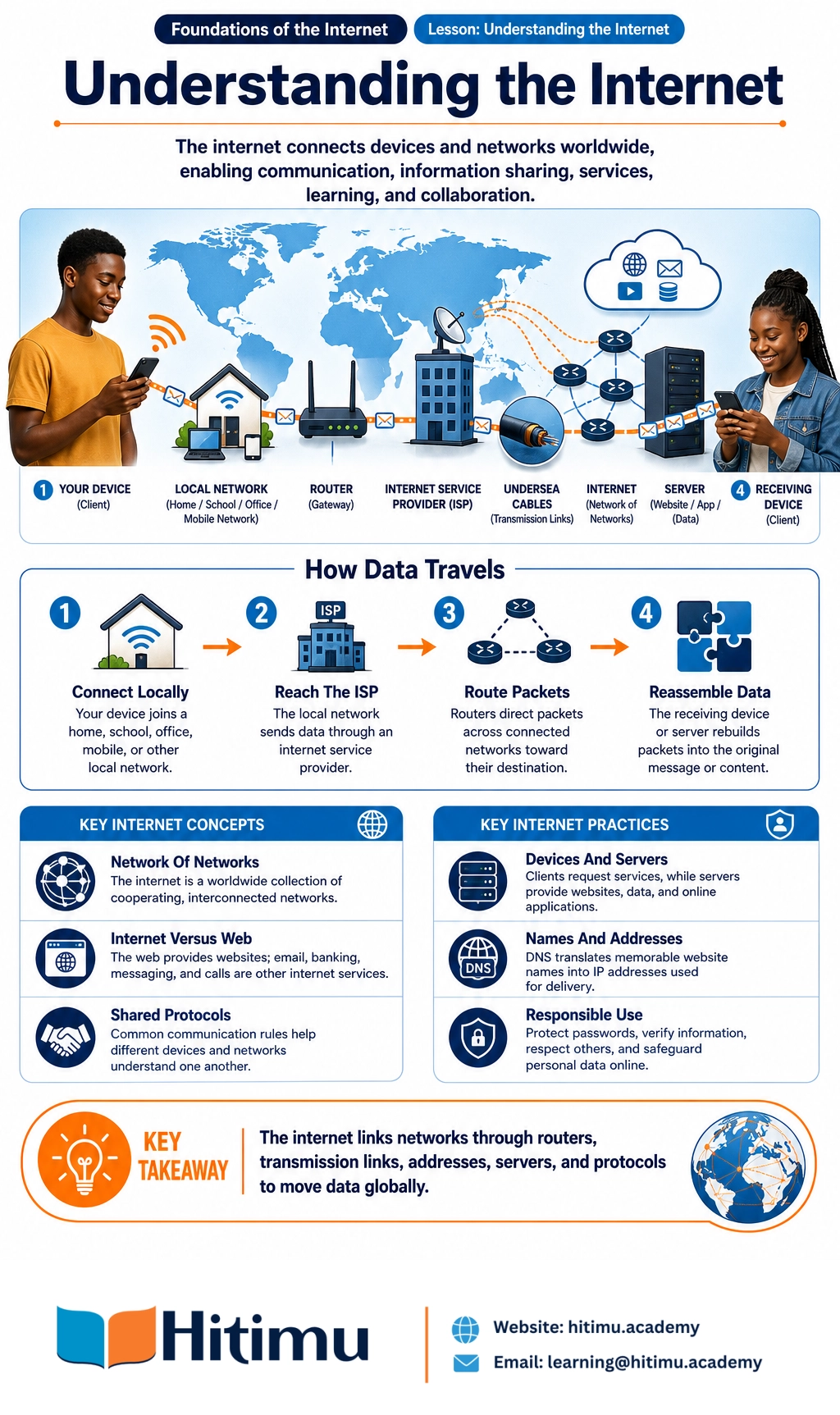
The internet is a global system that connects millions of computers, phones, servers and other devices. It allows people and organisations to communicate, share information, access services and work together across countries and continents.
When you send a message from Nairobi to a friend in Mombasa, watch a video hosted in another country, or use mobile money through an online service, your device may communicate with many other devices and networks. The internet makes this communication possible.
Learning Objectives
By the end of this lesson, you should be able to:
- Explain what the internet is in simple terms.
- Describe how separate networks connect to form the internet.
- Explain how data travels between devices.
- Identify the roles of devices, routers, internet service providers and servers.
- Describe why the internet supports global digital communication.
- Use internet services responsibly and safely.
What Is the Internet?
The internet is a worldwide network of interconnected computer networks. The word interconnected means that different networks are linked so that devices on one network can communicate with devices on another.
A network can be as small as two computers connected in an office or as large as a national telecommunications network. The internet connects many types of networks, including home networks, school networks, business networks, mobile networks and data-centre networks.
For this reason, the internet is often described as a network of networks. It is not one single computer, building or company. It is a collection of cooperating networks that use shared rules to communicate.
The Internet and the World Wide Web
The internet and the World Wide Web are related but different.
- The internet is the underlying system of connected networks, cables, wireless links, devices and communication rules.
- The World Wide Web is a service that uses the internet to provide websites and web pages through browsers.
Email, online banking, video calls, file transfers and messaging are also internet services. The web is only one part of what the internet can provide.
How Networks Become Interconnected
Local Networks
A local area network connects devices in a limited place, such as a home, school, office or library. Devices may connect using network cables or wireless signals.
For example, a Kenyan secondary school may have computers in a laboratory, teachers' laptops and a wireless access point. These devices can share a printer or connect to the school's internet service.
Internet Service Providers
An internet service provider, or ISP, connects customers to larger networks and the wider internet. A customer may connect to an ISP using fibre, mobile data, fixed wireless service or another connection.
In Kenya, a household might connect through a fibre provider, while a learner in a rural area might use mobile data. The connection methods differ, but both can provide access to internet services.
Routers
A router is a device that directs data between networks. It examines information about where data needs to go and chooses a path towards its destination.
A home router may connect phones and computers to an ISP. Larger routers operated by telecommunications companies help move data between cities, countries and continents.
Transmission Links
Networks are connected by different types of transmission links, including fibre-optic cables, copper cables, radio links and satellite connections. Fibre-optic cables carry information as pulses of light and are commonly used for high-capacity communication.
Much international internet traffic travels through undersea fibre-optic cables. These cables connect countries and continents, while land-based cables, mobile networks and other links connect users to the wider system.
How Data Travels Across the Internet
Data Is Divided into Packets
When you send information over the internet, the information is divided into small units called packets. Each packet contains part of the message and information that helps networks deliver it to the correct destination.
Packets from the same message may travel along different routes. At the destination, they are put back together so that the receiver sees the original message, image, audio or video.
A Simple Example
Suppose Amina in Kisumu sends a photograph to her cousin in Eldoret:
- Amina's phone connects to a local wireless or mobile network.
- The local network sends the photograph to an internet service provider.
- The photograph is divided into packets.
- Routers forward the packets through several connected networks.
- The packets arrive at the service or device used by Amina's cousin.
- The receiving system reassembles the packets and displays the photograph.
This process usually takes a very short time, although distance, network congestion, weak signals or service problems can cause delays.
Addresses and Names
Devices communicating on the internet need addresses. An IP address identifies a device or network location so that data can be sent to the right destination.
People usually find websites by using names that are easier to remember, such as a service name. The Domain Name System, or DNS, helps translate these names into IP addresses. It works much like a contact list that helps a device find the numerical address associated with a name.
Servers and Clients
A server is a computer or system that provides data or services to other devices. A client is a device or application that requests and uses those services.
When you open a news website, your browser acts as a client. It requests information from a web server, and the server sends back the content. A server may be located nearby or in a data centre in another country.
Rules That Help the Internet Work
Connected devices need common communication rules. These rules are called protocols. Protocols help devices understand how to address, send, receive and check information.
- Internet Protocol helps identify destinations and move packets between networks.
- Transmission Control Protocol helps split data into packets, check delivery and arrange packets in the correct order when required.
- Hypertext Transfer Protocol helps browsers and web servers exchange web content.
- Secure communication protocols help protect information as it travels between a device and an online service.
These shared rules allow equipment made by different companies and used in different countries to communicate.
Why the Internet Supports Global Communication
- Reach: People can communicate across towns, countries and continents.
- Speed: Messages and information can travel in seconds.
- Many types of communication: The internet supports text, voice, video, images, documents and interactive services.
- Shared standards: Common protocols allow different devices and networks to work together.
- Multiple paths: Data may be redirected when one route is busy or unavailable.
- Access to services: People can use education platforms, digital payments, health information, government services and online markets.
- Collaboration: Learners, researchers, businesses and communities can work together without being in the same place.
For example, a small business in Nakuru can advertise to customers in other counties, receive digital payments and communicate with suppliers abroad. A learner in Turkana can access educational material when a suitable connection and device are available.
What Happens When You Visit a Website?
- You enter a website name in a browser.
- Your device asks a DNS service to find the website's IP address.
- Your request travels through your local network, ISP and other networks.
- The website's server receives the request.
- The server sends the required content back in packets.
- Your browser reassembles the content and displays the page.
This sequence may include many systems, but it is normally completed quickly. The exact route can change depending on network conditions and the location of the service.
Important Limitations
The internet does not guarantee that every service is available everywhere. Access depends on electricity, network coverage, suitable devices, affordability and technical infrastructure.
Communication can also be affected by congestion, damaged cables, weak mobile signals, server failures or incorrect device settings. A slow connection does not necessarily mean that the entire internet is slow; the problem may be limited to one device, network or service.
Application and Reflection Activity
Choose one familiar internet activity, such as sending a WhatsApp message, joining a video lesson, checking a weather report or making an online payment. Write a short explanation using the questions below.
- What device are you using?
- How does your device connect to a local network?
- Which ISP or mobile network provides the connection?
- What server or online service are you trying to reach?
- What information is being sent or received?
- Why might the activity become slow or fail?
Then draw or describe a simple path using these terms: device, local network, router, ISP, other networks, server.
For example: My phone connects to a mobile network. The mobile network connects to an ISP. Routers send my message through other networks to a messaging service's server. The server delivers the message to the recipient's device.
Responsible and Safe Internet Use
- Protect passwords and do not share them unnecessarily.
- Use strong, different passwords for important accounts and enable additional security where available.
- Check that a website or message is trustworthy before sharing personal information or making a payment.
- Be careful with unexpected attachments, urgent requests and offers that seem too good to be true.
- Respect other people when communicating online. Do not send threats, harassment or harmful content.
- Think before sharing photographs, location details, school information or other personal data.
- Respect copyright and acknowledge the creators of information, images and other work.
- Keep devices, browsers and applications updated to reduce security risks.
- Use secure connections, especially when accessing accounts or handling financial information on public networks.
- Remember that internet access should be inclusive. Support people who may face barriers related to language, disability, cost or connectivity.
Lesson Summary
The internet is a global network of interconnected networks. Devices use routers, transmission links, addresses and shared protocols to exchange data. Information is commonly divided into packets, sent across one or more networks and reassembled at its destination. Servers provide services, while client devices request and use them.
Because networks around the world cooperate through common standards, the internet supports rapid global communication, learning, business, entertainment and public services. Understanding this basic structure helps you use online technologies more confidently, effectively and responsibly.